Finish every home on time and on budget.
The project management platform built for residential construction. Schedule, budgets, subcontractor portals, RFIs, change orders, and QuickBooks sync in one place — no per-seat fees, live in under a week.

The day-to-day chaos that pulls you away from building.
Your framer doesn't show up and you find out at 7am on site
Budget "surprises" halfway through a build eat into your margin
Forty texts a day to coordinate one trade, and none of it searchable
The client wants a project update and you don't have one ready
You're juggling six builds and can't see which lots are slipping until the GC tells you
Draw schedules and budgets live in different spreadsheets that nobody trusts on day 30
Your lender wants a portfolio update Friday and you're still chasing PMs for actuals
Change orders get verbal-approved on site and you find out about them at month-end close
Four areas where residential builders see results in the first month.
The capabilities our customers tell us paid for the subscription almost immediately.
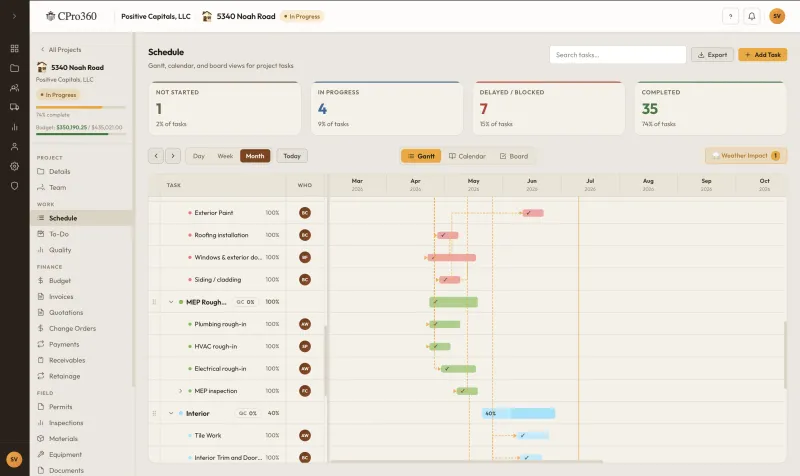
Stay on schedule
Lock in dependencies, reschedule with one drag, and notify your subcontractors the moment something shifts.
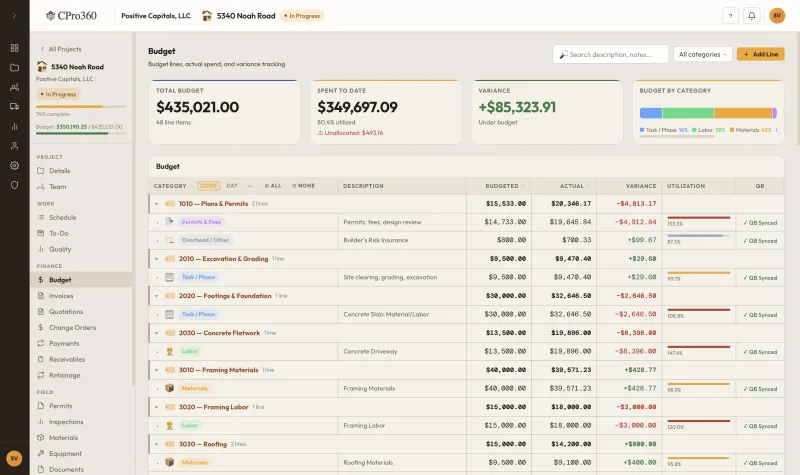
Stay on budget
See budget versus actual on every line item. Catch overruns before they eat into your margin.
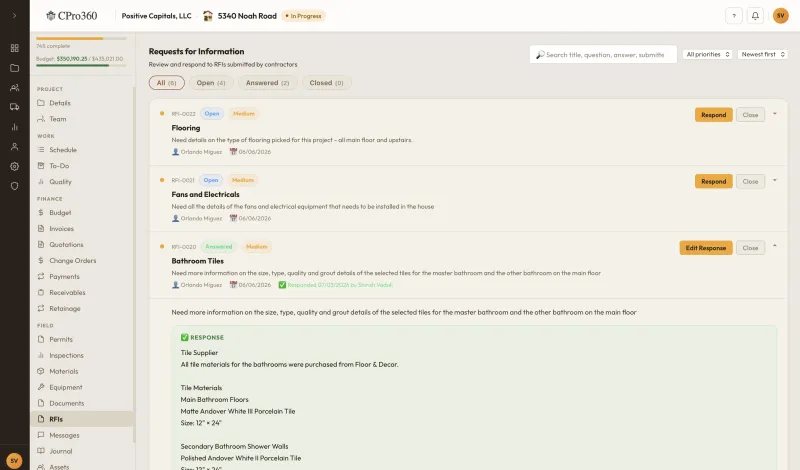
Centralise project communication
Every message, photo, and RFI is tied to the project it belongs to instead of buried in a phone or email thread.
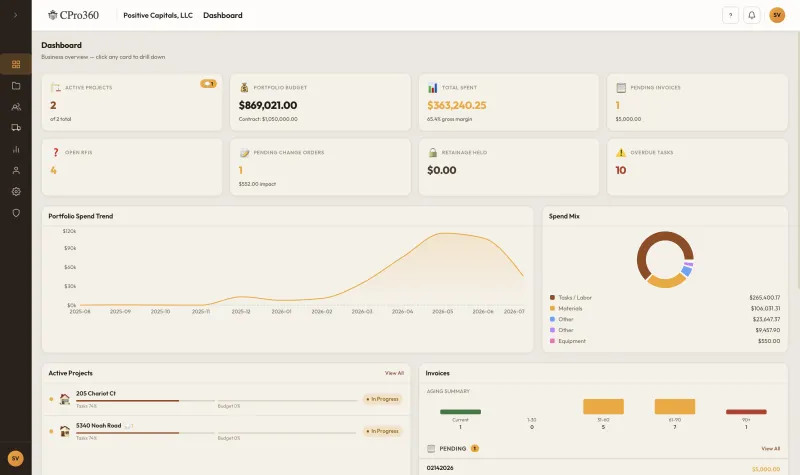
Know where every job stands
A single dashboard across every active build, so Monday mornings start with answers instead of questions.
Four capabilities residential builders rely on the most.
A closer look at the parts of the product our customers tell us were the deciding factor.
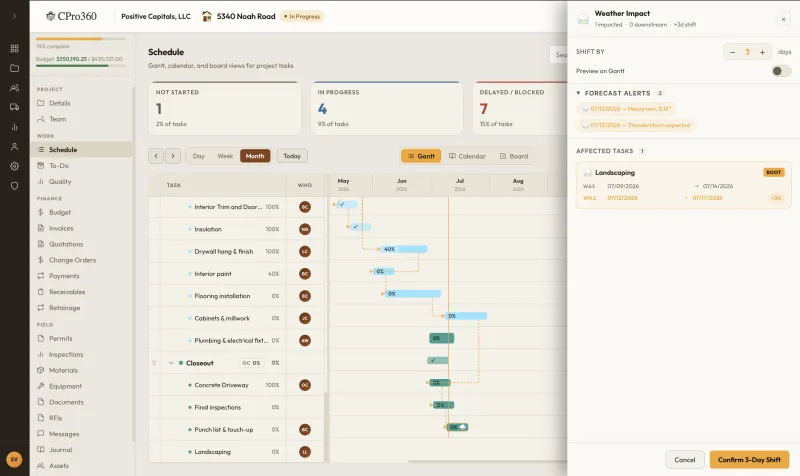
Stop losing days to weather you saw coming.
CPro360 monitors the forecast for every jobsite and adjusts weather-sensitive tasks up to two weeks ahead, then notifies the affected subcontractors before they load the truck.
- 14-day forecast monitored per project location
- Automatic rescheduling for framing, roofing, concrete pours, paint, and other weather-sensitive trades
- Subcontractors receive SMS and email alerts the moment their task shifts
- Clients see the updated timeline in their portal, so there are no awkward phone calls
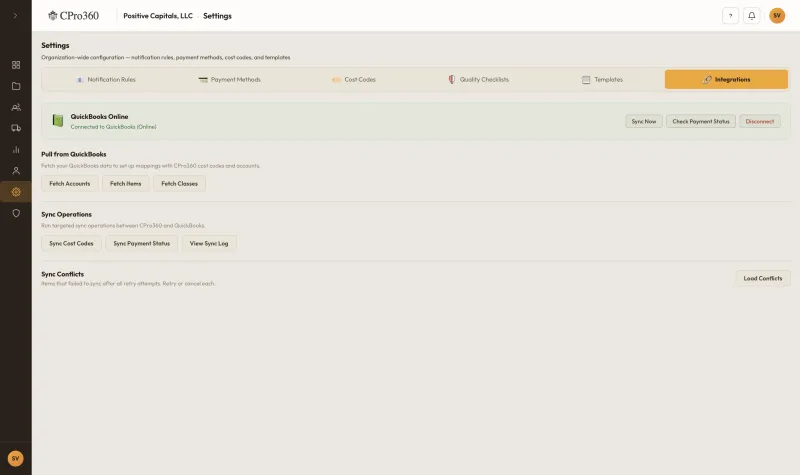
Fits the accounting you already run.
Your bookkeeper keeps QuickBooks. Your project managers keep CPro360. Invoices, bills, change orders, and payments flow both ways, so nothing gets re-keyed and nothing slips through.
- Two-way QuickBooks Online and Desktop sync for invoices, bills, payments, and chart of accounts
- Xero, Sage, and Buildertrend CSV import and export
- Job costing tied to your cost codes, not ours
- Per-project P&L available before the month closes
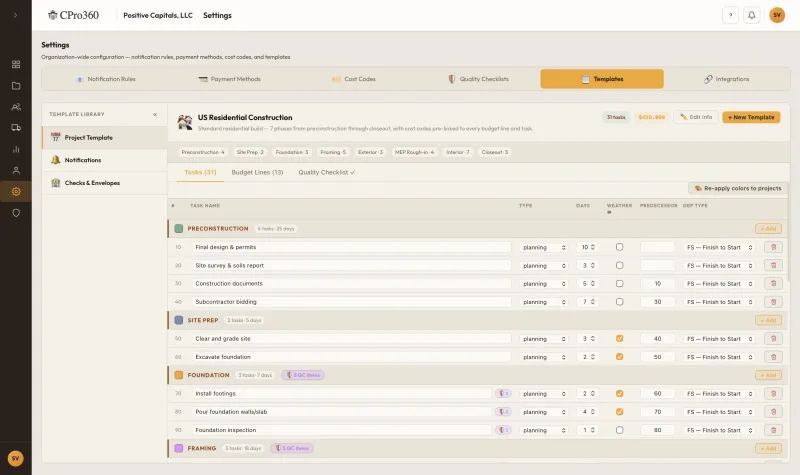
Start with templates built by builders, not a blank page.
Every new project starts with proven residential templates: schedules, budgets, cost codes, and quality and inspection checklists. The first day is spent reviewing a known-good plan, not assembling one.
- Schedule templates for custom, semi-custom, and spec builds
- Pre-loaded residential cost code library covering CSI and NAHB
- Quality and inspection checklists for every phase of the build
- Clone from your last successful project in a single click
Bring every subcontractor and GC into the project. No per-seat fees.
CPro360 is the only residential PM tool where the subcontractor and GC portals are bundled into every plan. Invite ten subs or five hundred. The price stays the same. Each portal ships as both a web app and a native iOS and Android app, so the people in the field have the same view as the people in the office.
- Unlimited subcontractor seats. They sign in free and see only what you assign them.
- Unlimited GC and owner seats with their own dashboard, document folder, and approvals
- Native iOS and Android apps for both portals, so subs read tasks, capture photos, scan receipts, and submit invoices straight from the jobsite
- Every conversation, change order, and invoice stays tied to the project rather than a text thread
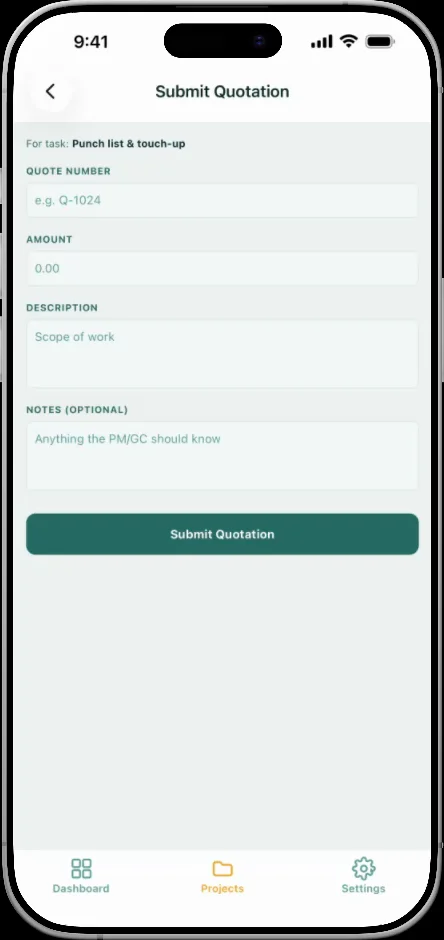
The crew on site has the same tools as the office.
Three capabilities that show up in every plan and matter the most once you leave the desk.
Native mobile apps
Full iOS and Android apps for both the GC portal and the subcontractor portal. Photos, RFIs, daily logs, quality checklists, document uploads, and invoice capture all work from the truck or the slab.
English & Spanish, throughout
Web and mobile apps both ship with full English and Mexican Spanish interfaces. Each user picks their language once and it follows them everywhere, so the PM in the office and the framer in the field each read in their own language.
Context-sensitive help on every screen
A built-in help panel knows which page you are on and answers the questions that page actually generates. New PMs ramp up without scheduling training calls, and tenured users surface advanced features without hunting through docs.
How we compare to Buildertrend, JobTread, CoConstruct, and Procore.
If you're a residential developer or GC, you've probably looked at all four. Here is how CPro360 compares feature for feature and fee for fee.
| Capability | Buildertrend | JobTread | CoConstruct | Procore | CPro360 |
|---|---|---|---|---|---|
| Built specifically for residential developers & GCs | Residential-leaning | Residential-leaning | Residential (now part of Buildertrend) | Commercial-first | Yes, the only audience we serve |
| Subcontractor portal pricing | Paid add-on / per-seat | Per-seat on most plans | Limited on lower tiers | Per-seat at scale | Included, unlimited subs on every plan |
| GC / owner portal pricing | Add-on | Per-seat | Limited | Per-seat | Included, unlimited GCs and owners |
| Transparent published pricing | Yes | Yes | Quote on request | Contact sales only | Yes, three tiers with no surprise add-ons |
| Onboarding time to first live project | 2 to 4 weeks (paid coach) | 1 to 2 weeks | 2 to 4 weeks | 6 to 12 weeks (implementation team) | Under a week, self-serve with no consultant |
| Weather-aware schedule auto-shifts | No | No | No | Manual | Yes, built in at no extra cost |
| AI receipt & invoice capture | Limited OCR | Limited OCR | Limited OCR | Add-on | Yes, with line items, totals, and discounts auto-extracted |
| Multi-project portfolio view for developers | Per-job dashboards | Per-job dashboards | Per-job dashboards | Yes (enterprise SKU) | Yes, included on every plan |
| QuickBooks two-way sync | Yes | Yes | One-way | Connector | Yes, two-way and native |
| Native change-order workflow tied to budget & schedule | Module | Module | Module | Module | Yes, first-class instead of bolted on |
| Native iOS & Android apps for subs and GCs | Mobile web + app for GCs only | Mobile web + app for GCs only | App for GCs, web for subs | Yes (sub seats are paid) | Yes, both portals, included |
| Multi-lingual interface (English & Spanish) | English only | English only | English only | Yes (enterprise SKU) | Yes, per-user, included |
Comparison based on publicly available pricing and feature pages as of April 2026. Competitors update their products often. Let us know if anything is out of date and we will correct it. CoConstruct was acquired by Buildertrend in 2021 and continues to be sold as a co-branded offering; we list it separately because residential GCs still evaluate it under that name.
Three steps from sign-up to your first live project.
Set up your project
Pick a template or start from scratch. Drop in your schedule, invite your subcontractors, and upload your budget.
Assign tasks and track progress
Everyone knows what is next. Field updates flow up from the jobsite, and change orders can be approved in a single tap.
Stay ahead of every build
A single dashboard covers every project. The view stays current as the work progresses.
What customers say about running CPro360.
"CPro360 has been an absolute game-changer for managing my residential projects. Before this, schedules, budgets, receipts, and progress updates were scattered across different tools. Now I know exactly where each project stands at a glance."
"The one-click project setup and customizable templates transformed our operations in the Atlanta region. Mobile access keeps our team updated on the go, which has made a real difference in how we manage residential projects."
"CPro360 transformed how we manage residential construction in Harris County. Streamlined workflows, better communication, and no more costly delays. Our projects stay on schedule and within budget consistently now."
Estimate what CPro360 saves you.
Move the sliders to match your business. The numbers reflect averages across current CPro360 customers.
Your estimated impact
Based on averages from CPro360 builders. Actual results vary.
Published pricing, no sales call required.
Three transparent tiers. What you see is what you pay.
30-day free trial · no credit card required · cancel anytime
AI capture for receipts, invoices, and quotations.
Snap a photo or drop in a PDF. CPro360 reads the document, pulls out the line items, totals, taxes, and discounts, and pre-fills the right form so a project manager only has to review and save. Every extractor below runs in real time from the web or the mobile app.
Material receipts
Snap or upload a supplier receipt and CPro360 returns the vendor, receipt number, date, line items with quantities and unit costs, taxes, delivery, and any discounts. The receipt and its payment land in the right project budget line without re-keying.
Subcontractor invoices
Drop the PDF a sub sends you and CPro360 fills in invoice number, dates, line items, subtotal, tax, and total. The PM reviews against the linked task and approves in one click.
Quotations
Same flow for quotes coming in from new subs or suppliers. CPro360 turns a PDF into a structured quotation row tied to the task, so you compare quotes apples-to-apples without typing them.
Three more places AI quietly helps without taking over.
Common questions from residential builders.
No — we're residential-only on purpose. Templates, cost codes, schedule logic, and the subcontractor workflow are tuned for single-family, townhome, and small multi-family builders. If you do commercial tenant improvements or industrial work, Procore or one of the commercial-first tools will fit you better.
Yes. The mobile app caches everything locally and syncs as soon as you pick up signal again. Your PM can log progress from a basement framing job with no bars.
Most builders are live on their first project in under a week. We walk you through a 30 minute setup call and import your existing schedule templates and budget categories for you.
Yes. Sub access is included on every plan at no extra cost. They get a simple view with only what they need: their tasks, dates, and files.
Yes, both QuickBooks Online and Desktop. We sync invoices, bills, and payments in both directions. We also support Xero, Sage, and Buildertrend exports.
Change orders are native, not bolted on. Each one is tied to your budget line items and schedule, so approving it updates your forecast and notifies the affected subs automatically.
Yes. You can import from MS Project, Smartsheet, Buildertrend, or a plain CSV. Most builders have all their active projects loaded on day one.
Yes. CPro360 ships a native iOS and Android app for both the GC portal and the subcontractor portal. The app supports offline updates from the jobsite, photo capture, RFI submission, receipt scanning, daily logs, and quality checklists. It is included in every plan at no extra cost.
Yes. The web and mobile interfaces ship in English and Mexican Spanish. Each user picks their language once in account settings; the preference follows them across web, mobile, and email notifications.
Yes. Take a photo or upload a PDF of a receipt, a sub invoice, or a quotation, and CPro360 extracts the vendor, dates, line items, taxes, discounts, and totals automatically. The project manager reviews the parsed values and saves. The same extractor works from the web app and the mobile app.
Ready to see CPro360 on one of your projects?
Book a 20-minute demo
See CPro360 running on one of your own projects. We usually get back to you within a couple of hours on weekdays.
Contact us
Questions, partnerships, or support. Drop us a note and we will get back to you.
Move your residential builds onto software built for them.
See CPro360 running on one of your own projects. Twenty minutes with no pitch deck.